如何使用 OpenClaw, n8n 和 Neo4j 构建 GraphRAG 数据摄取流水线 (Ingestion Pipeline)

本技术指南提供了一个全面且循序渐进的教程,教你如何构建一个集成 OpenClaw, n8n, YouTube Data API, Neo4j AuraDB 和 Gemini embeddings 的 AI 自动化工作流。这条 GraphRAG Ingestion Pipeline(数据摄取流水线)是实现未来任何 GraphRAG 架构的关键基础步骤。
系统架构与目标
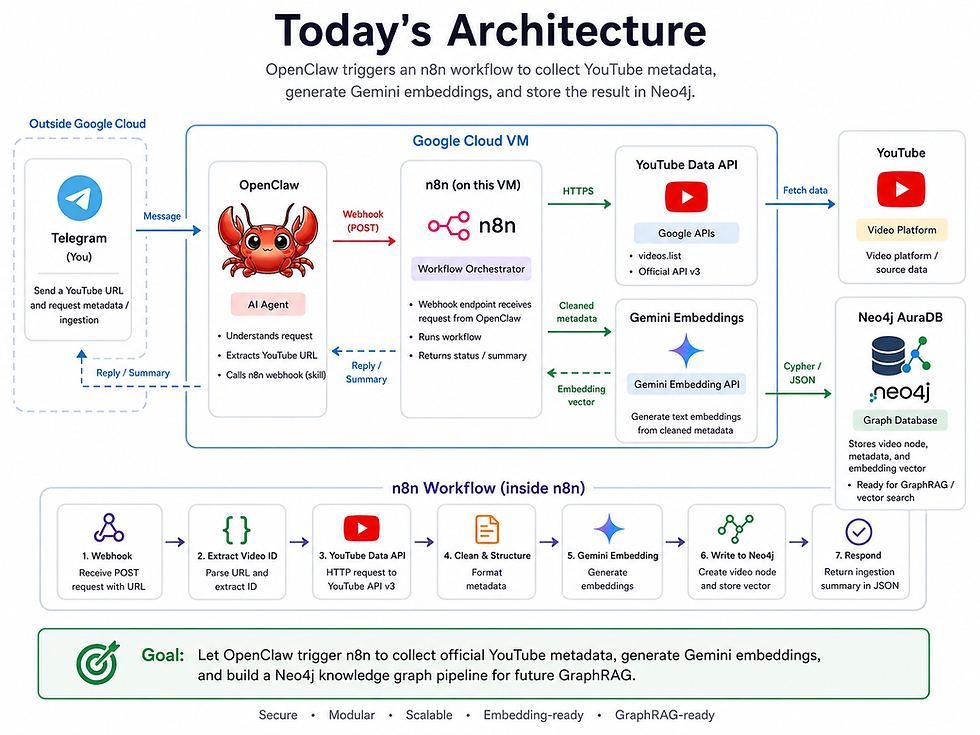
本工作流的核心目标,是让我们的 OpenClaw AI 智能体能够处理 YouTube URL,并自主执行以下确定性的流水线任务:
精准提取 YouTube 视频 ID。
通过 API 收集官方 YouTube 元数据(包含标题、描述、标签等)。
使用 Gemini API 生成 768 维度的语义嵌入向量。
将视频、频道和主题节点直接写入 Neo4j。
这是今天教程的完整架构图:
2. 环境配置与凭据
在 n8n 中构建自动化工作流之前,您必须先准备好底层数据库并生成所需的 API 密钥。
2.1 初始化 Neo4j AuraDB
创建实例:访问 Neo4j 官网,注册并创建一个免费层(Free-tier)的 AuraDB 实例。
配置:创建一个新实例(例如命名为 youtube-data)。
保存凭据:这一步至关重要,请务必立即下载系统提供的凭据 .txt 文件。该文件包含了您的连接地址 (Connection URI)、用户名 (Username)、密码 (Password) 以及数据库名称 (Database),这些是后续连接 n8n 时必须具备的信息。
2.2 生成 Gemini API 密钥
Google AI Studio:使用您的 Gmail 账号登录 Google AI Studio。
创建密钥:导航至 API keys 部分,生成一个新的密钥并将其复制到剪贴板备用。
3. 为 GraphRAG Ingestion Pipeline 配置 n8n
外部服务准备就绪后,我们需要配置 n8n 以确保其能够安全地与这些服务进行通信。
存储 Gemini 凭据:在 n8n 中,导航至 Credentials,添加新凭据,搜索 Google Gemini(PaLM) Api,并粘贴您的 API 密钥。
安装 Neo4j 节点:前往 Settings > Community Nodes,安装名为 n8n-nodes-neo4j 的软件包。这个社区节点包至关重要,因为它使 n8n 能够执行图数据库查询。
存储 Neo4j 凭据:创建另一个凭据,搜索 Neo4j API,并仔细将从下载的 AuraDB 文本文件中获取的详细信息(URI、用户名、密码、数据库)复制到相应字段中。

4. 构建 GraphRAG Ingestion Pipeline
我们现在将构建核心的 n8n 工作流。创建一个新工作流并命名为 youtube-neo4j-embedding。
专家提示: 在开发过程中,请断开起始的 Webhook 节点,并使用手动的 Edit Fields 节点来注入测试用的 youtube_url(例如:https://www.youtube.com/watch?v=AN2WL_jBoY8)。这允许你在不依赖 Telegram 的情况下内部测试流水线。
4.1 构建 document_text
YouTube API 返回的是结构化的 JSON 数据(包含标题、频道、描述、主题、标签等)。Embedding 模型需要一个单一、连贯的文本块。
添加一个 Code 节点,命名为 build document_text 并粘贴以下 JavaScript 代码:
const title = $json.title || "";
const description = $json.description || "";
const channel = $json.channel_title || "";
const publishedAt = $json.published_at || "";
const topics = ($json.topics || []).join(", ");
const tags = ($json.tags || []).join(", ");

const documentText = `
Title: ${title}

Channel: ${channel}

Published at: ${publishedAt}

Topics: ${topics}

Tags: ${tags}

Description:
${description}
`.trim();

return [
  {
    json: {
      ...$json,
      document_text: documentText
    }
  }
];
4.2 请求 Gemini Embeddings
与其使用循环的 AI 子节点,我们使用标准的 HTTP Request 节点 来获取原始的 embedding 数组。添加该节点并进行如下配置:
Method: POST
URL: https://generativelanguage.googleapis.com/v1beta/models/gemini-embedding-001:embedContent
Authentication: Predefined Credential Type -> Google Gemini(PaLM) Api
Send Body: On
Body Content Type: JSON
Specify Body: Using JSON
在 JSON 正文中,我们安全地传递 document_text 并请求一个 768 维度的向量:
{
  "content": {
    "parts": [
      {
        "text": {{ JSON.stringify($json.document_text) }}
      }
    ]
  },
  "output_dimensionality": 768
}
(注意:不要使用 ={{$json.document_text}},因为描述中的换行符或引号会破坏 JSON 结构)。

4.3 将 Embedding 与元数据合并
HTTP Request 节点仅输出数组结果。我们需要将其合并回原始元数据。添加一个名为 merge embedding with metadata 的 Code 节点:
const original = $("build document_text").item.json;

const embedding = $json.embedding?.values || [];

if (!Array.isArray(embedding) || embedding.length === 0) {
  throw new Error("No embedding values found from Gemini response.");
}

return [
  {
    json: {
      ...original,
      embedding,
      embedding_dimensions: embedding.length
    }
  }
];
4.4 生成 Cypher 查询
我们将构建一个动态的 Cypher 查询,通过 MERGE 命令安全地处理换行符、表情符号和重复摄取情况。添加一个名为 build cypher query 的 Code 节点:
function cleanText(value, maxLength = 5000) {
  if (value === null || value === undefined) return "";

  return String(value)
    .replace(/\r\n/g, "\n")
    .replace(/\r/g, "\n")
    .replace(/\u0000/g, "")
    .trim()
    .slice(0, maxLength);
}

function cypherString(value) {
  return JSON.stringify(cleanText(value));
}

function cypherList(values) {
  if (!Array.isArray(values)) return "[]";

  const cleaned = values
    .map(v => cleanText(v, 100))
    .filter(v => v.length > 0);

  return JSON.stringify([...new Set(cleaned)]);
}

const videoId = cleanText($json.video_id, 100);
const title = cleanText($json.title, 500);
const url = cleanText($json.url, 1000);
const description = cleanText($json.description, 5000);
const publishedAt = cleanText($json.published_at, 100);
const channelId = cleanText($json.channel_id, 200);
const channelTitle = cleanText($json.channel_title, 500);

const viewCount = Number($json.statistics?.view_count || 0);
const likeCount = Number($json.statistics?.like_count || 0);
const topics = Array.isArray($json.topics) ? $json.topics : [];

const documentText = cleanText($json.document_text, 8000);
const embedding = Array.isArray($json.embedding) ? $json.embedding : [];

const cypherQuery = `
MERGE (c:Channel {channel_id: ${cypherString(channelId)}})
SET c.channel_title = ${cypherString(channelTitle)}

MERGE (v:Video {video_id: ${cypherString(videoId)}})
SET v.title = ${cypherString(title)},
    v.url = ${cypherString(url)},
    v.description = ${cypherString(description)},
    v.published_at = ${cypherString(publishedAt)},
    v.view_count = ${viewCount},
    v.like_count = ${likeCount},
    v.document_text = ${cypherString(documentText)},
    v.embedding = ${JSON.stringify(embedding)},
    v.embedding_dimensions = ${embedding.length},
    v.updated_at = datetime()

MERGE (c)-[:PUBLISHED]->(v)

WITH v, ${cypherList(topics)} AS topicNames
FOREACH (topicName IN topicNames |
  MERGE (t:Topic {name: topicName})
  MERGE (v)-[:HAS_TOPIC]->(t)
)

RETURN v.video_id AS video_id,
       v.title AS title,
       size(v.embedding) AS embedding_dimensions,
       "success" AS neo4j_write_status,
       "Video node created or updated with metadata and Gemini embedding" AS message
`;

return [
  {
    json: {
      ...$json,
      cypher_query: cypherQuery
    }
  }
];
4.5 执行与 Webhook 响应
添加 Neo4j 社区节点。
将资源(Resource)设置为 Graph Database,操作(Operation)设置为 Execute Query。
在 Cypher Query 字段中,输入 {{$json.cypher_query}}。
使用 Respond to Webhook 节点终止工作流,将生成的 JSON 摘要发送回智能体。
删除手动测试用的 "Edit Fields" 节点,重新连接主 Webhook 节点(确保路径为 youtube-neo4j-embedding),然后点击 Publish。

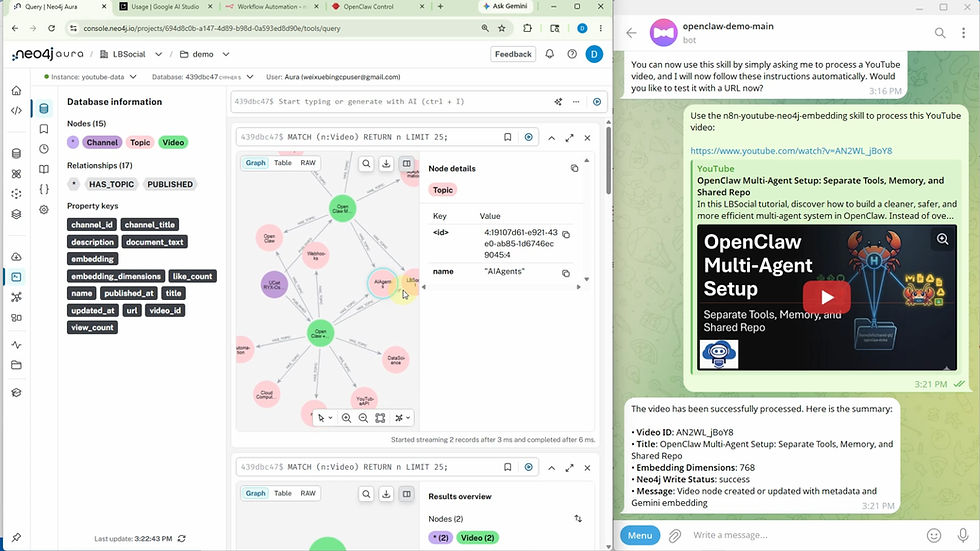
图谱模式演示
以下是我们刚才构建的 Neo4j 图谱模式的可交互展示。你可以点击节点来查看其嵌入的属性。
5. 将工作流集成到 OpenClaw
要通过 AI 智能体执行此自动化任务,必须在 OpenClaw 中将其定义为自定义技能。
进入您的 OpenClaw 控制面板。
关键步骤:禁用任何旧的“仅提取元数据”技能,以防止智能体在选择工具时产生困惑。
打开 Skill Creator(技能创建器)并提交以下详细提示词:
Create a new OpenClaw skill named n8n-youtube-neo4j-embedding.

The skill should extract a YouTube URL from the user request and call this local n8n webhook:

curl -sS -X POST "http://localhost:5678/webhook/youtube-neo4j-embedding" \
  -H "Content-Type: application/json" \
  -d '{"youtube_url":"YOUTUBE_URL"}'

Replace YOUTUBE_URL with the user-provided YouTube URL.

This skill only passes the YouTube URL to n8n. The n8n workflow handles YouTube metadata collection, Gemini embedding, and Neo4j writing.

After the webhook returns JSON, summarize these fields:
video_id, title, embedding_dimensions, neo4j_write_status, and message.
创建完成后,可以通过向 Telegram 智能体发送 YouTube 链接来测试该技能。它将触发 n8n Webhook,运行完整的流水线,并返回确认 Neo4j 写入状态的 JSON 摘要。
6. 总结:你的 GraphRAG Ingestion Pipeline 已就绪
此架构依赖于稳健的模块化设计原则:OpenClaw 负责处理对话界面,n8n 编排 API 自动化,Gemini 处理语义文本嵌入,而 Neo4j 作为持久的图与向量存储。
有了这些结构化存储的数据,后续教程将探索如何利用自然语言查询 Neo4j 图谱,以实现语义搜索并运行完整的 GraphRAG 工作流。


留言