How to Build a GraphRAG Ingestion Pipeline with OpenClaw, n8n & Neo4j

Updated: May 13
This technical guide provides a comprehensive, step-by-step walkthrough for constructing an AI automation workflow that integrates OpenClaw, n8n, the YouTube Data API, Neo4j AuraDB, and Gemini embeddings. This ingestion pipeline is a critical foundational step for any future GraphRAG architecture.
System Architecture and Objectives
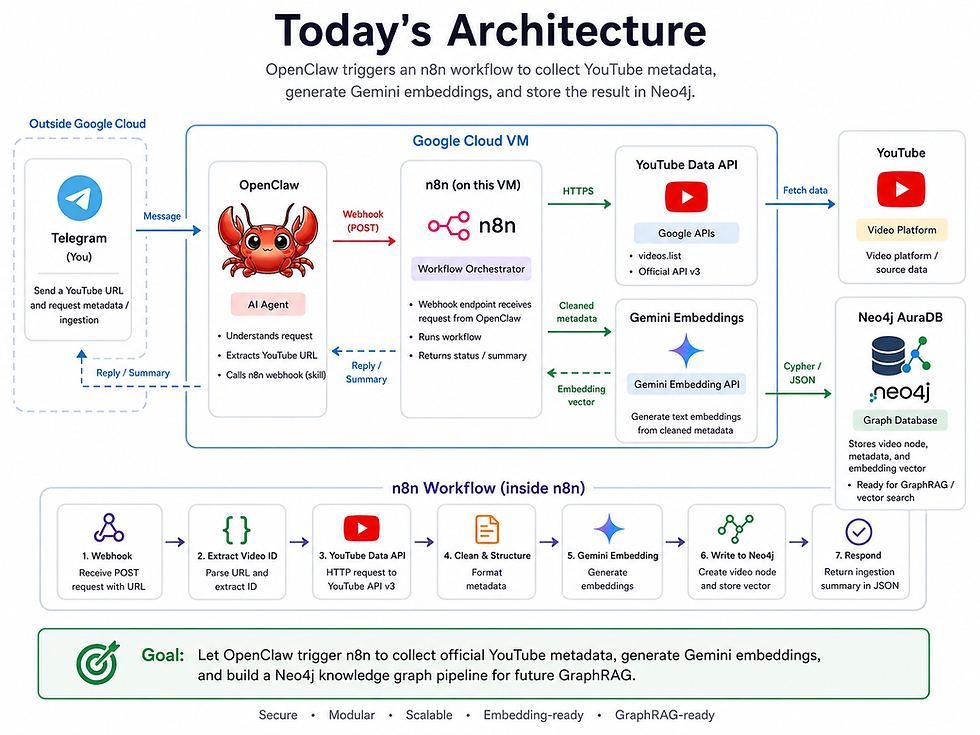
The goal of this workflow is to allow our OpenClaw AI agent to process a YouTube URL and autonomously execute the following deterministic pipeline:
Extract the YouTube video ID.
Collect official YouTube metadata (Title, Description, Tags, etc.) via the API.
Generate a 768-dimensional semantic embedding using the Gemini API.
Write the Video, Channel, and Topic nodes directly into Neo4j.
Here is the complete architecture for today's tutorial:
2. Environment Setup and Credentials
Before building the automation in n8n, you must provision the underlying database and generate the required API keys.
2.1 Initializing Neo4j AuraDB
Create Instance: Navigate to the Neo4j website and register for a free-tier AuraDB instance.
Configuration: Create a new instance (e.g., named youtube-data).
Credentials: Crucially, download the provided credentials .txt file immediately. This file contains your Connection URI, Username, Password, and Database name, which are essential for the n8n connection.
2.2 Generating the Gemini API Key
Google AI Studio: Log in to Google AI Studio using your Gmail account.
Create Key: Navigate to the API keys section, generate a new key, and copy it to your clipboard.
3. Configuring n8n for the GraphRAG Ingestion Pipeline
With the external services prepared, we need to configure n8n to communicate with them securely.
Store Gemini Credentials: In n8n, navigate to Credentials, add a new credential, search for Google Gemini(PaLM) Api, and paste your API key.
Install the Neo4j Node: Go to Settings > Community Nodes and install the package named n8n-nodes-neo4j. This community node package is essential as it enables n8n to execute Graph Database queries.
Store Neo4j Credentials: Create another credential, search for Neo4j API, and meticulously copy the details (URI, Username, Password, Database) from your downloaded AuraDB text file.

4. Building the GraphRAG Ingestion Pipeline
We will now build the core n8n workflow. Create a new workflow and name it youtube-neo4j-embedding.
Pro Tip: During development, disconnect your starting Webhook node and use a manual Edit Fields node to inject a test youtube_url (e.g., https://www.youtube.com/watch?v=AN2WL_jBoY8). This allows you to test the pipeline internally without relying on Telegram.
4.1 Constructing the document_text
The YouTube API returns structured JSON (Title, Channel, Description, Topics, Tags). The embedding model requires a single, coherent text block.
Add a Code node named build document_text and paste the following JavaScript:
const title = $json.title || "";
const description = $json.description || "";
const channel = $json.channel_title || "";
const publishedAt = $json.published_at || "";
const topics = ($json.topics || []).join(", ");
const tags = ($json.tags || []).join(", ");

const documentText = `
Title: ${title}

Channel: ${channel}

Published at: ${publishedAt}

Topics: ${topics}

Tags: ${tags}

Description:
${description}
`.trim();

return [
  {
    json: {
      ...$json,
      document_text: documentText
    }
  }
];
4.2 Requesting Gemini Embeddings
Instead of the circular AI sub-nodes, we use a standard HTTP Request node to get the raw embedding array. Add the node and configure it exactly as follows:
Method: POST
URL: https://generativelanguage.googleapis.com/v1beta/models/gemini-embedding-001:embedContent
Authentication: Predefined Credential Type -> Google Gemini(PaLM) Api
Send Body: On
Body Content Type: JSON
Specify Body: Using JSON
In the JSON body, we securely pass the document_text and request a 768-dimensional vector:
{
  "content": {
    "parts": [
      {
        "text": {{ JSON.stringify($json.document_text) }}
      }
    ]
  },
  "output_dimensionality": 768
}
(Note: Do not use ={{$json.document_text}} as line breaks or quotes in descriptions will break the JSON structure).

4.3 Merging Embeddings with Metadata
The HTTP Request node only outputs the array. We need to merge it back. Add a Code node named merge embedding with metadata:
const original = $("build document_text").item.json;

const embedding = $json.embedding?.values || [];

if (!Array.isArray(embedding) || embedding.length === 0) {
  throw new Error("No embedding values found from Gemini response.");
}

return [
  {
    json: {
      ...original,
      embedding,
      embedding_dimensions: embedding.length
    }
  }
];
4.4 Generating the Cypher Query
We will construct a dynamic Cypher query that safely handles line breaks, emojis, and duplicate ingestions using MERGE commands. Add a Code node named build cypher query:
function cleanText(value, maxLength = 5000) {
  if (value === null || value === undefined) return "";

  return String(value)
    .replace(/\r\n/g, "\n")
    .replace(/\r/g, "\n")
    .replace(/\u0000/g, "")
    .trim()
    .slice(0, maxLength);
}

function cypherString(value) {
  return JSON.stringify(cleanText(value));
}

function cypherList(values) {
  if (!Array.isArray(values)) return "[]";

  const cleaned = values
    .map(v => cleanText(v, 100))
    .filter(v => v.length > 0);

  return JSON.stringify([...new Set(cleaned)]);
}

const videoId = cleanText($json.video_id, 100);
const title = cleanText($json.title, 500);
const url = cleanText($json.url, 1000);
const description = cleanText($json.description, 5000);
const publishedAt = cleanText($json.published_at, 100);
const channelId = cleanText($json.channel_id, 200);
const channelTitle = cleanText($json.channel_title, 500);

const viewCount = Number($json.statistics?.view_count || 0);
const likeCount = Number($json.statistics?.like_count || 0);
const topics = Array.isArray($json.topics) ? $json.topics : [];

const documentText = cleanText($json.document_text, 8000);
const embedding = Array.isArray($json.embedding) ? $json.embedding : [];

const cypherQuery = `
MERGE (c:Channel {channel_id: ${cypherString(channelId)}})
SET c.channel_title = ${cypherString(channelTitle)}

MERGE (v:Video {video_id: ${cypherString(videoId)}})
SET v.title = ${cypherString(title)},
    v.url = ${cypherString(url)},
    v.description = ${cypherString(description)},
    v.published_at = ${cypherString(publishedAt)},
    v.view_count = ${viewCount},
    v.like_count = ${likeCount},
    v.document_text = ${cypherString(documentText)},
    v.embedding = ${JSON.stringify(embedding)},
    v.embedding_dimensions = ${embedding.length},
    v.updated_at = datetime()

MERGE (c)-[:PUBLISHED]->(v)

WITH v, ${cypherList(topics)} AS topicNames
FOREACH (topicName IN topicNames |
  MERGE (t:Topic {name: topicName})
  MERGE (v)-[:HAS_TOPIC]->(t)
)

RETURN v.video_id AS video_id,
       v.title AS title,
       size(v.embedding) AS embedding_dimensions,
       "success" AS neo4j_write_status,
       "Video node created or updated with metadata and Gemini embedding" AS message
`;

return [
  {
    json: {
      ...$json,
      cypher_query: cypherQuery
    }
  }
];
4.5 Execution and Webhook Response
Add the Neo4j community node.
Set the Resource to Graph Database and Operation to Execute Query.
In the Cypher Query field, input {{$json.cypher_query}}.
Terminate the workflow with a Respond to Webhook node to send the JSON summary back to the agent.
Delete your manual "Edit Fields" testing node, reconnect the main Webhook node (ensure path is youtube-neo4j-embedding), and Publish.

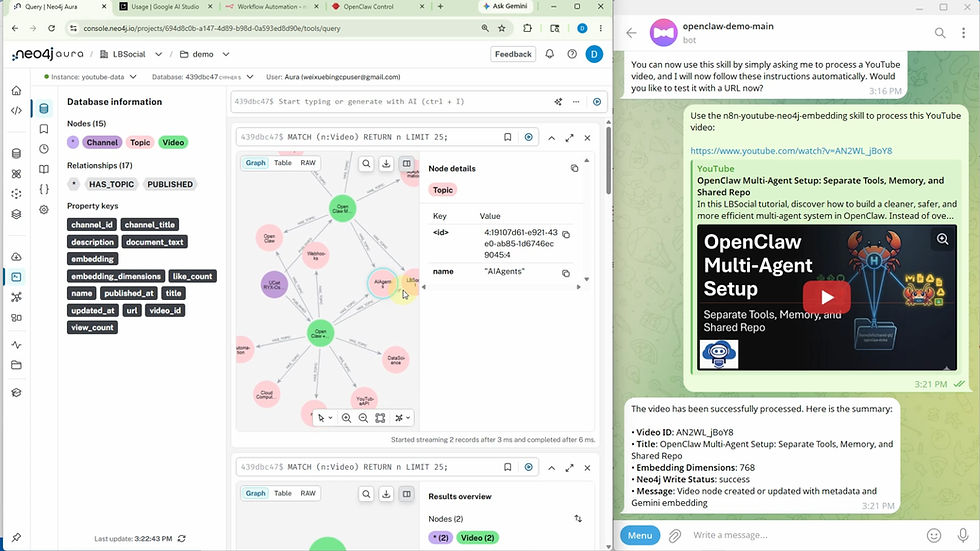
Graph Schema Demo
Below is an interactive representation of the Neo4j graph schema we just built. You can click on the nodes to inspect their embedded properties.
5. Integrating the Workflow with OpenClaw
To execute this automation via an AI agent, it must be defined as a custom skill within OpenClaw.
Go to your OpenClaw dashboard.
Crucial: Disable any old metadata-only skills to prevent the agent from getting confused about which tool to route to.
Open the Skill Creator and submit the following detailed prompt:
Create a new OpenClaw skill named n8n-youtube-neo4j-embedding.

The skill should extract a YouTube URL from the user request and call this local n8n webhook:

curl -sS -X POST "http://localhost:5678/webhook/youtube-neo4j-embedding" \
  -H "Content-Type: application/json" \
  -d '{"youtube_url":"YOUTUBE_URL"}'

Replace YOUTUBE_URL with the user-provided YouTube URL.

This skill only passes the YouTube URL to n8n. The n8n workflow handles YouTube metadata collection, Gemini embedding, and Neo4j writing.

After the webhook returns JSON, summarize these fields:
video_id, title, embedding_dimensions, neo4j_write_status, and message.
Upon creation, test the skill by sending a YouTube URL to your Telegram agent. It will trigger the n8n webhook, run the full pipeline, and return a clean JSON summary confirming the status of the Neo4j write.
6. Conclusion: Your GraphRAG Ingestion Pipeline is Ready
This architecture relies on robust modular design principles: OpenClaw manages the conversational agent interface, n8n orchestrates API automation, Gemini processes semantic text embeddings, and Neo4j serves as the persistent graph and vector store.
With this data structured and stored, subsequent tutorials will explore querying the Neo4j graph utilizing natural language for semantic search and operationalizing full GraphRAG workflows.


Comments