Geo GraphRAG Tutorial: Neo4j & Free Gemini API

Imagine asking an AI, "What are people saying about AI and machine learning in London, UK, within a radius of 100 kilometers?" and getting a highly specific, grounded answer pulling exact usernames, locations, and hashtags.
That is exactly what we are going to build today. In this tutorial, we are taking traditional RAG (Retrieval-Augmented Generation) to the next level by building a Geo-Augmented GraphRAG
Prerequisites & Resources
Before we dive in, make sure you have access to the code and understand the foundational data structure we are working with:
Source Code: Access the Jupyter Notebook on GitHub
Previous Tutorial 1: Building a Social Media Knowledge Graph with Python and Neo4j

Previous Tutorial 2: Neo4j Tutorial: Cypher & Generative AI Dashboard

1. Installation & Securing Your Free Gemini API Key
First, you need to set up your environment and grab a free Gemini API key from Google AI Studio. As shown in the video, this free tier is incredibly generous and allows us to run the entire pipeline at no cost.
To start, install the necessary Python dependencies:
pip install neo4j google-genai python-dotenv -qThen, initialize your connections to Neo4j and the Gemini API:
from neo4j import GraphDatabase
from google import genai
import os

# Connect to Gemini Free API
client = genai.Client(api_key="YOUR_GEMINI_API_KEY")

# Connect to Neo4j
NEO4J_URI = "neo4j+s://your-database.databases.neo4j.io"
NEO4J_AUTH = ("neo4j", "your-password")
driver = GraphDatabase.driver(NEO4J_URI, auth=NEO4J_AUTH)

driver.verify_connectivity()
print("✅ Connected to Neo4j and Gemini!")
2. The Social Media Graph Structure
To understand GraphRAG, we first need to understand our data structure.
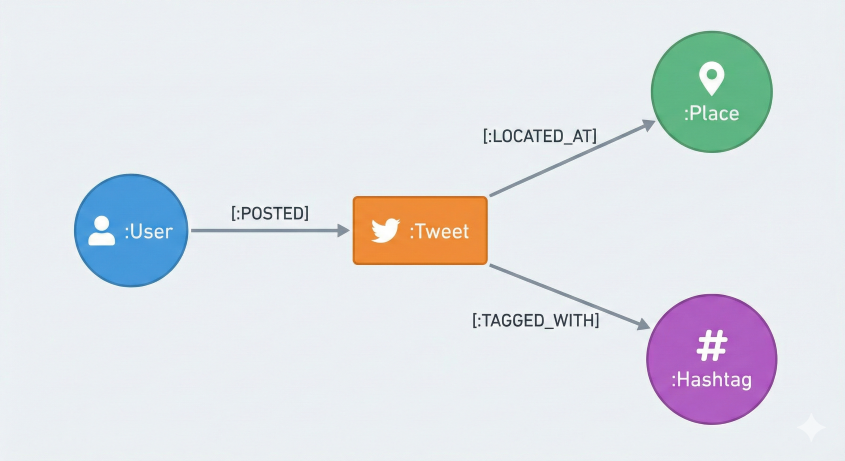
A traditional RAG system retrieves different embeddings separately. But with a GraphRAG, every dot is connected! A User posts a Tweet located at a Place and tagged with Hashtags.
3. Generating 3072-Dimensional Vector Embeddings
The first step in our pipeline is converting our text into multi-dimensional numbers (vectors) so the computer can understand semantic similarities. We use Gemini's gemini-embedding-001 model to convert every tweet's text into a 3072-dimensional vector.

def get_embeddings(texts: list[str]) -> list[list[float]]:
    """Get Gemini embeddings for a batch of texts."""
    response = client.models.embed_content(
        model="models/gemini-embedding-001",
        contents=texts,
    )
    return [emb.values for emb in response.embeddings]
Next, we tell Neo4j to create an Approximate Nearest Neighbor (ANN) search index so it can quickly compare these embeddings:
# Create the Neo4j Vector Index for fast semantic search
with driver.session(database="neo4j") as session:
    session.run("""
        CREATE VECTOR INDEX tweet_embeddings IF NOT EXISTS
        FOR (t:Tweet) ON (t.embedding)
        OPTIONS {indexConfig: {
          `vector.dimensions`: 3072,
          `vector.similarity_function`: 'cosine'
        }}
    """)
4. Geo GraphRAG Retrieval: Expanding the Context
If you ask a traditional RAG system, "Which cities generate the most discussions about AI?", it often fails because the raw tweet text might not explicitly mention the city.

GraphRAG solves this. After finding similar tweets via vector search, we traverse the graph to collect rich context, such as the author, location, and hashtags.
def graph_rag_search(question: str, k: int = 5) -> list[dict]:
    q_embedding = get_embeddings([question])[0]

    cypher = """
        // 1. Vector Search
        CALL db.index.vector.queryNodes('tweet_embeddings', $k, $embedding)
        YIELD node AS tweet, score

        // 2. Graph Traversal: enrich with relationships
        MATCH (author:User)-[:POSTED]->(tweet)
        OPTIONAL MATCH (tweet)-[:LOCATED_AT]->(place:Place)
        OPTIONAL MATCH (tweet)-[:TAGGED_WITH]->(hashtag:Hashtag)

        RETURN tweet.text AS text, author.username AS author,
               place.name AS location, collect(DISTINCT hashtag.name) AS hashtags, score
        ORDER BY score DESC
    """
    with driver.session(database="neo4j") as session:
        result = session.run(cypher, k=k, embedding=q_embedding)
        return [dict(record) for record in result]
5. Cypher-Augmented Generation (CAG)
Sometimes users ask analytical questions like, "How many tweets were posted from each city?" Vector search isn't good at counting. Instead, we can train Gemini (gemini-2.5-flash) to write native Neo4j Cypher queries for us.

CYPHER_SYSTEM_PROMPT = """You are a Neo4j Cypher expert. Given the user's question, generate a Cypher query to answer it.
The graph schema is:
- (:User)-[:POSTED]->(:Tweet)-[:LOCATED_AT]->(:Place)
- (:Tweet)-[:TAGGED_WITH]->(:Hashtag)
Return ONLY raw Cypher."""

def cypher_rag_answer(question: str) -> str:
    # 1. Generate Cypher using Gemini
    cypher_response = client.models.generate_content(
        model="gemini-2.5-flash",
        contents=question,
        config=genai.types.GenerateContentConfig(system_instruction=CYPHER_SYSTEM_PROMPT, temperature=0.0)
    )

    # 2. Execute query against Neo4j...
    # 3. Summarize raw results with Gemini to present to the user!
6. Geo GraphRAG in Action: Geospatial Queries & Point-in-Radius
Finally, we reach the climax of our system: Geo-Augmented GraphRAG. Every Place node has a point() property storing coordinates. We can use Neo4j's native point.distance() function to filter tweets before running our semantic vector search.

def geo_graph_rag_search(question: str, city_name: str, radius_km: int = 100, k: int = 5) -> list[dict]:
    q_embedding = get_embeddings([question])[0]

    cypher = """
        // 1. Get city center
        MATCH (p:Place {name: $city}) WITH p.location AS center

        // 2. Vector search (broad net)
        CALL db.index.vector.queryNodes('tweet_embeddings', $k_broad, $embedding)
        YIELD node AS tweet, score

        // 3. Geo filter — keep only tweets within radius
        WHERE point.distance(tweet.location, center) < $radius_m

        // 4. Graph traversal
        MATCH (author:User)-[:POSTED]->(tweet)
        OPTIONAL MATCH (tweet)-[:LOCATED_AT]->(place:Place)

        RETURN tweet.text AS text, author.username AS author,
               place.name AS location, score
        LIMIT $k
    """
    with driver.session(database="neo4j") as session:
        result = session.run(cypher, city=city_name, radius_m=radius_km * 1000,
                             k_broad=k * 10, k=k, embedding=q_embedding)
        return [dict(record) for record in result]
Conclusion
By combining the structural power of Neo4j with the reasoning capabilities of Google's Gemini Free API, we built a complete GraphRAG pipeline from a social media knowledge graph. From semantic vector indexing to complex geospatial radius filtering, GraphRAG systems bridge the gap between simple chatbots and true analytical assistants.
If you found this tutorial helpful, be sure to check out the full code on GitHub and try running it with your own search terms. Let us know in the comments how you plan to use GraphRAG in your own projects!


Comments